
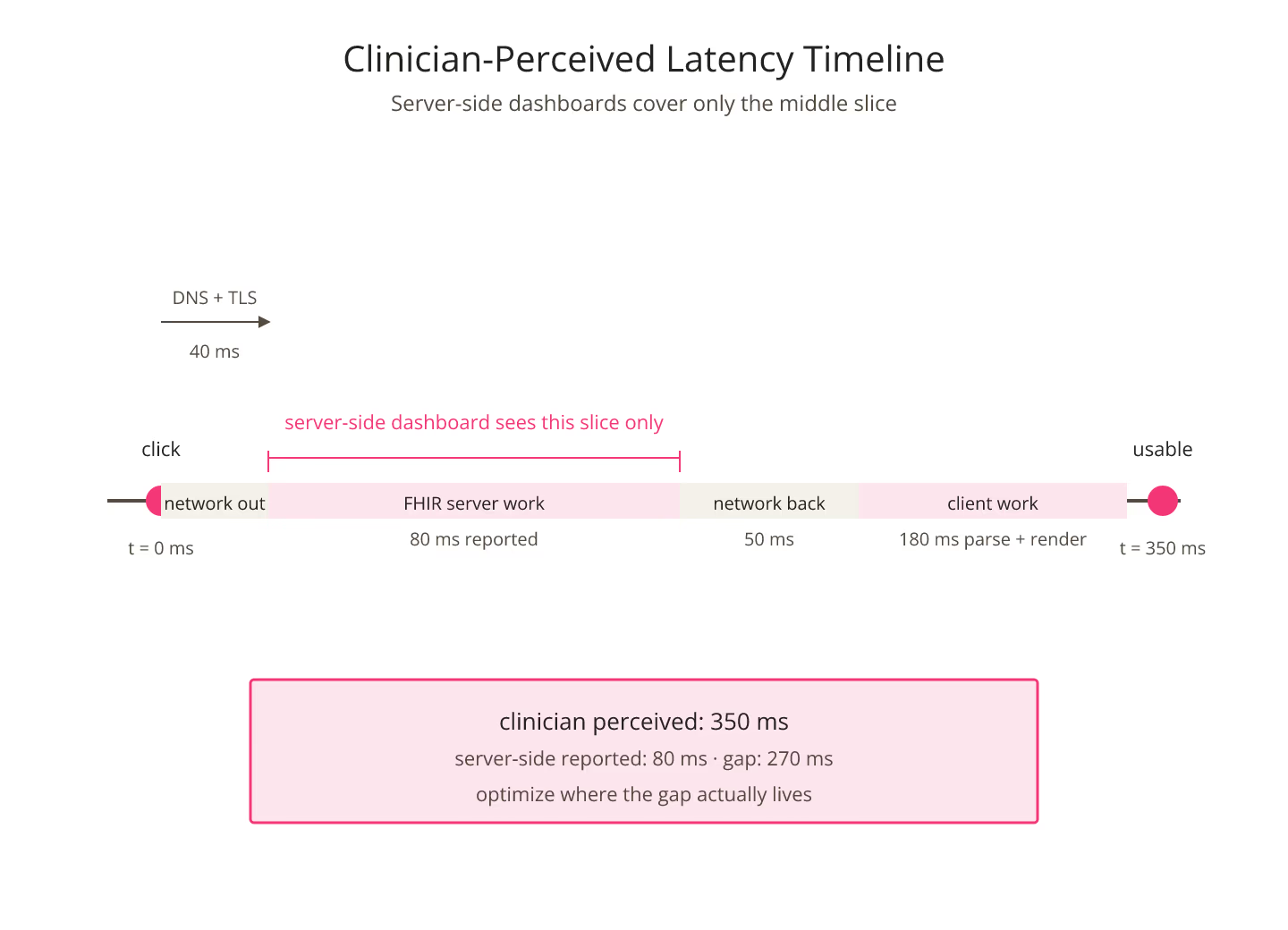
Have you ever noticed how a clinician describes an app as slow even when the server-side latency dashboard is entirely green? The disconnect is not imaginary. Server-side numbers measure the moment the FHIR API returns; clinician perception starts at the click and ends when the screen looks usable. Everything between those two moments belongs to a different measurement.
Measuring what the clinician actually feels is the discipline that closes the gap. For more on the surrounding patterns, more FHIR implementation patterns collects the wider set.
The Latency the Clinician Feels
Clinician-perceived latency starts when the input happens: a click, a tap, a keystroke that triggers a data load. It ends when the screen shows something useful. That interval covers the network trip out, the FHIR API work, the network trip back, the client-side JavaScript execution, the rendering pipeline, and any downstream data assembly the front end does before painting.
A FHIR API that responds in eighty milliseconds is not, on its own, a fast application. When the client does another two hundred milliseconds of work after the response arrives, the clinician feels the full sum. For the specific tail-percentile question that lives inside all of this, the p50 vs p99 gap that kills FHIR user experience covers the split.
Instrument the Client, Not Just the Server
The first move is to instrument the front end. Every action that triggers a data load should record the moment of input and the moment the resulting screen becomes usable. The gap between them is the number that matters.
Browser Performance APIs, mobile app analytics, and RUM libraries all give you this measurement. The point is to name it explicitly and to track it as a first-class metric, not to leave it as an assumed side effect of the server-side view. A pass through the site's FHIR p99 latency lookup can bracket the server-side portion; the client-side portion needs its own instrumentation.
Bucket by Workflow, Not by URL
Clinicians think in workflow actions, not HTTP endpoints. Open chart. Order labs. Sign the note. Each action expands into several FHIR calls, and the total experience latency is the sum of those calls plus the client-side work.
Bucketing metrics by workflow action turns a wall of URL-latency numbers into a small set of user-facing outcomes. Reports that show only per-URL latency force the reader to reconstruct the workflow every time; reports that show per-action latency answer the user experience question directly.
Cold-Start Latency Deserves Its Own Metric
The first click after a session start almost always feels slower than the tenth. Caches are cold, connection pools are empty, and any lazy-loaded modules are still on the wire. Server-side dashboards average this together with the warm case and mask the difference.
Report cold-start latency separately. The cold and warm numbers together tell the clinician-experience story more accurately than a single average would.
The Percentile Curve Matters More Than the Average
Averages hide the tail. A single slow interaction in a session of thirty leaves the clinician with a specific memory: the moment the screen did nothing. Reporting the ninety-fifth and ninety-ninth percentile of clinician-perceived latency captures those moments.
Deployments that report only the average end up defending numbers that do not match the user impression. For the search-parameter interactions that live inside these curves, search parameter combinations that surprise you at scale covers a common source of surprise.
The Trust Compounds
Here is the thing: trust is built one interaction at a time. A user who has a fast experience in the first ten minutes forgives a slow interaction in the eleventh. A user who has three slow interactions in a row starts describing the whole app as broken, whatever the numbers say.
Measuring latency the way the clinician perceives it is the shortest path to noticing that shift before it becomes a complaint.
Sources
- Google SRE Workbook chapter on user-centric SLIs - Google SRE Workbook chapter on user-centric SLIs, canonical reference on user-perceived latency measurement