

Have you ever plotted FHIR Bundle latency against Bundle size and watched the line stay flat for a while and then snap upward? The snap is not linear scaling. It is a knee point in the curve, and every Bundle-driven workload eventually finds it. Understanding where the knee lives on your deployment is what separates a stable latency plan from one that gets caught out at the wrong volume.
The trick is to plot the curve on purpose. For related walkthroughs, FHIR background reading is the collection on the home page.
What the Curve Actually Looks Like
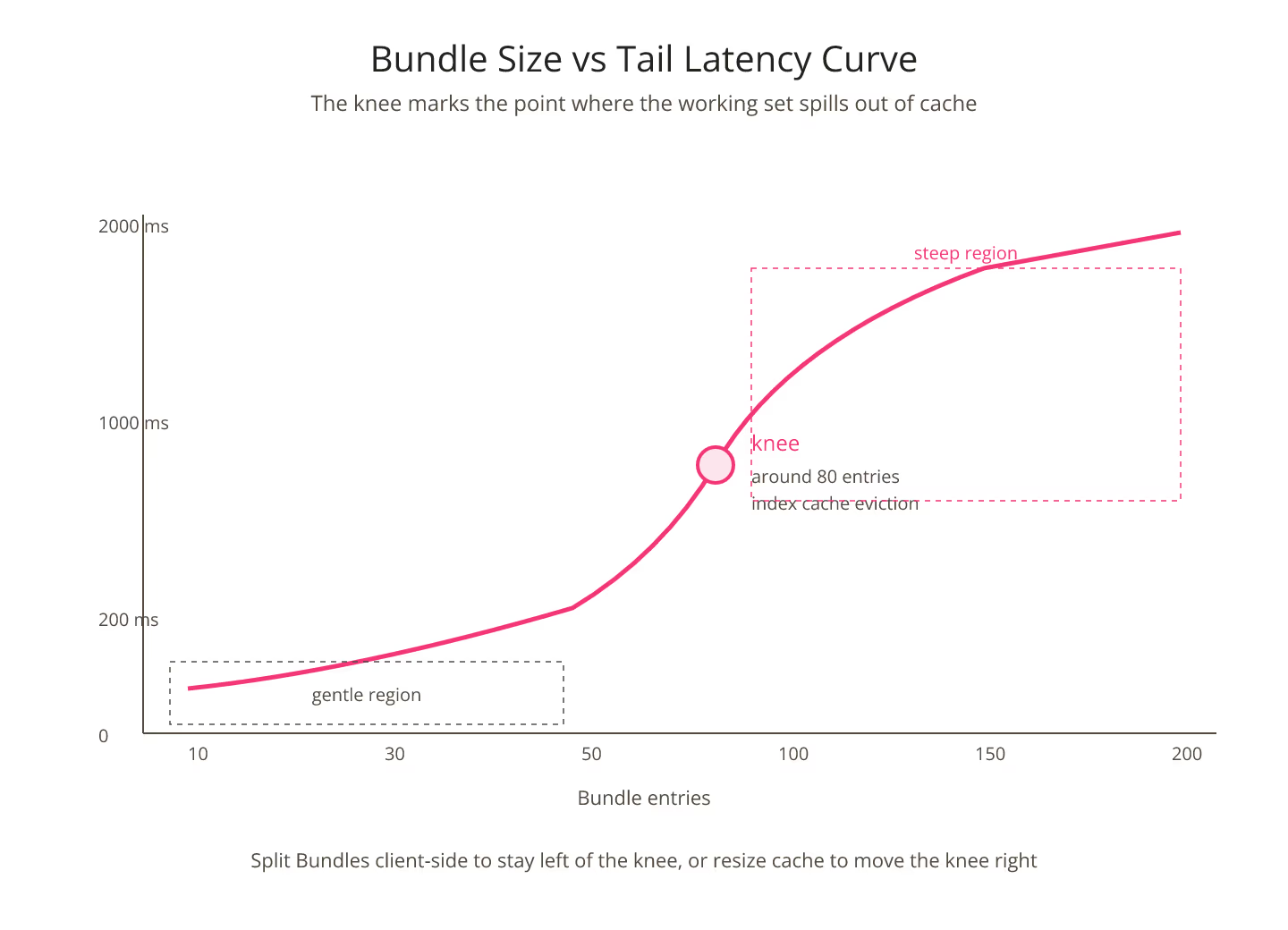
At small Bundle sizes latency is roughly linear. A ten-entry Bundle takes a bit more than a five-entry Bundle. Twenty entries take a bit more than ten. The line stays gentle until a specific size, and then something breaks: cache scope, transaction lock hold time, index seek cost, or serialization buffer size.
Past the knee, latency grows steeply. The knee is not fixed across deployments; it depends on the FHIR engine, the query mix inside the Bundle, and the persistence tier. A pass through the site's FHIR p99 latency lookup surfaces the tail figures per engine so you can bracket where your knee is likely to sit.
Why the Knee Exists
The knee comes from resource contention. Below a certain Bundle size the FHIR server processes the entries within one working set: indexes fit in cache, transaction locks release quickly, response payload fits in a single serialization buffer. Above that size any of those constraints can flip, and the tail moves.
The most common flip is index cache eviction. When the Bundle contains enough entries to exhaust the working set of the index cache, subsequent entries hit disk. Disk-bound entries take an order of magnitude longer than cache-hit entries, and the overall latency jumps accordingly.
Bundle Size in the Wild
Production Bundle sizes rarely follow a neat distribution. Most workflows send a heavy tail of large batches during ingestion windows and a light tail of small batches during interactive traffic. The average Bundle size is the wrong number to size against; the ninety-fifth percentile Bundle size is closer to what actually stresses the server.
Sizing plans that use the average under-count the peak. For the wider budget conversation, FHIR latency budgets need to be per-resource, not global covers the framing.
Moving the Knee
Two levers move the knee outward:
- Larger index caches. Every additional gigabyte of index cache lets the working set hold more entries before eviction, which pushes the knee to a larger Bundle size.
- Simpler entries. Bundle entries that resolve internal references cheaply hit the knee at larger sizes than entries with heavy
_includeexpansions.
Neither lever moves the knee infinitely. The disciplined pattern is to measure where the knee currently sits, decide whether to push it or work around it, and revisit both quarterly.
Splitting the Bundle Client-Side
The alternative to moving the knee is not to cross it. Client-side batching that keeps every Bundle under the known knee size trades a few extra HTTP requests for predictable latency. On a workflow that would otherwise fire two-hundred-entry Bundles that live in the tail, splitting into four fifty-entry Bundles usually wins overall.
The split does add network overhead, and it interacts with caching. For the caching side, when caching hides FHIR latency until the cache expires covers the risk pattern.
Reporting the Knee Explicitly
Bundle latency reports that show only the average number hide the knee. Reports that plot latency against Bundle size expose it and let the reader see the shape of the curve.
Every FHIR deployment that carries transactional traffic should own its curve. Naming the knee gives operations a threshold to alert on and a lever to tune. For the search-parameter surface that lives inside many Bundles, search parameter combinations that surprise you at scale is the accompanying reference.
Sources
- HL7 FHIR core specification of Bundle resource - HL7 FHIR core specification of Bundle resource, canonical reference for Bundle sizing behavior